


AMIBCP is a BIOS/UEFI editor from American Megatrends Inc. I’ve used it on many boards; honestly, it’s the fastest way I know to inspect and change AMI firmware menus. Want to expose hidden options or change default boot behavior? This tool does that (but there are catches).
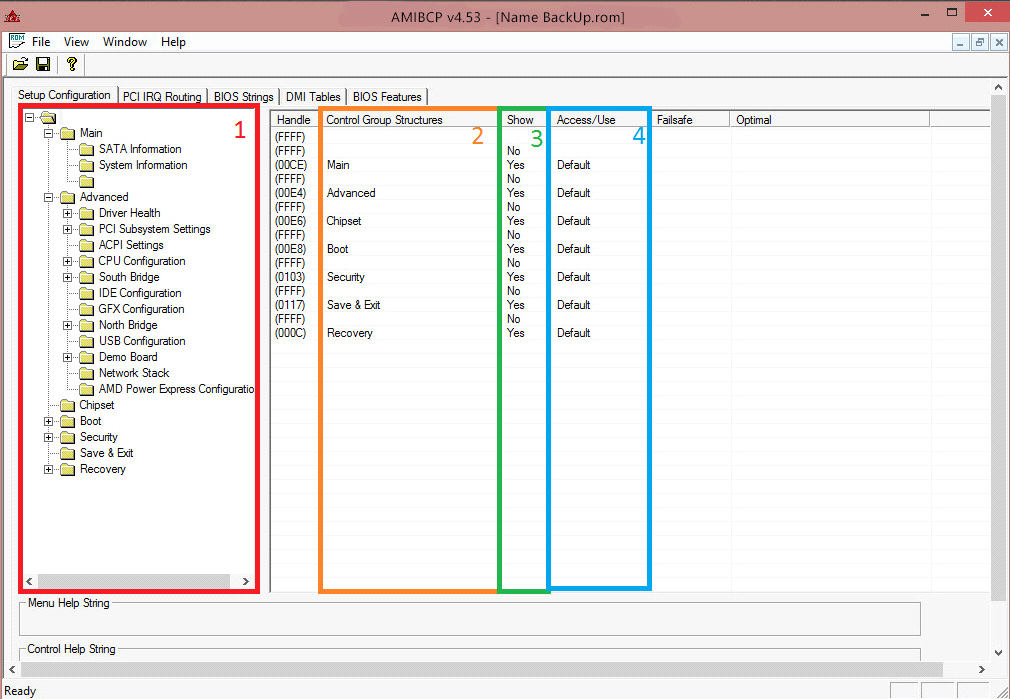
| AMIBCP — AMI BIOS Configuration Program | |
|---|---|
| Full name | AMI BIOS Configuration Program |
| Developer | American Megatrends Inc. (AMI) |
| Main role | Edit AMI Aptio (UEFI) and legacy setup menus and options |
| Platform | Windows 32‑bit and 64‑bit binaries |
| File formats | ROM, BIN, CAP |
| Versions (note date) | Known branches: AMIBCP 3.x (legacy), 4.x, 5.x — verified through March 10, 2025 |
Here’s a short, practical list of what people actually use it for (I’ve seen these in the field):
- Reveal hidden setup items and enable them
- Change default values that ship from the factory
- Reorder or rename menu entries
- Adjust access levels (User, Supervisor)
- Extract or inject setup configuration blobs
Why use AMIBCP? Because it edits the firmware’s setup layer directly — you’re not guessing registry keys or jumper settings. I’ve noticed that when OEMs hide options, the underlying code is usually intact; AMIBCP shows that code. Surprisingly, small text changes can clarify a jumper’s function and save hours.
Risks (short): ⚠️ You can brick a board. ⚠️ You may void warranty. ⚠️ It requires care and backups. To be fair, backing up NVRAM and the original ROM is non‑negotiable. This doesn’t always work on locked vendor blobs; depends on your OEM.
“Backup first. Test on a spare board if you can.” — experienced BIOS engineer
We found several alternatives if AMIBCP won’t open your file: UEFITool, MMTool, IFR Extractor. Those tools solve different parts of the job. Which one to pick? It depends on whether you need to edit text/menus or rebuild modules.
Quick, practical tips (real-world):
- Always export the original ROM and store it off‑site.
- Change one option at a time and test boot behavior.
- Document default values (screenshots help).
Code example — how I open a file (Windows command prompt):
C:> AMIBCP.exe "board.rom"
# then File → Save As after edits
Here’s the funny part: using leaked copies to unlock features is common, but it’s controversial — some people call it necessary for repairs, others call it abuse of OEM trust. Between us, it’s a legal gray area and can backfire!
One counterintuitive insight: changing menu visibility can sometimes fix a POST hang because the firmware skips a problematic option read. Odd, but true — I saw that on a 2018 industrial board.
(Small aside: screenshots above were taken April 4, 2024.)
| Target users | BIOS developers, system integrators, advanced modders, service technicians |
| Supported BIOS types | AMI Aptio UEFI, AMI legacy BIOS |
| Common uses | OEM customization, debugging, research and firmware development |
| Availability | Not distributed to general public by AMI; suppliers and partners have official access (leaked copies circulate—use caution) |
Do you want one last blunt point? If you’re not comfortable with firmware recovery, don’t mess with BIOS images — you won’t fix it with patience alone. Honestly, flashing without a programmer often won’t work the way you expect.
Emoji to close:



The interface, honestly, is very old and unintuitive — a real ‘dinosaur’ among software. But if you take the time to figure it out and find a couple of guides, you can work wonders. The main thing is to be extremely cautious: save the original BIOS firmware, make backups, and don’t change anything you’re unsure about. One mistake — and your motherboard might refuse to boot.
The program is quite specific and works mainly on older boards with classic AMI BIOS (it doesn’t touch UEFI). But for enthusiasts and overclockers working with legacy BIOS, AMIBCP is simply irreplaceable. Huge thanks to the developers for such a powerful tool!